
The short answer
YNAB is the best fit if you want to give every dollar a job before payday, and Monarch if two partners want every account in one shared view. EveryDollar and Goodbudget have free plans. Rocket Money is built for finding subscriptions, Quicken Simplifi for an automatic spending plan, and PocketGuard for a simple leftover-money budget.
- Best for hands-on budgetersYNABZero-based method; one subscription shared by up to six people.Visit YNAB
- Best for couples and householdsMonarchUnlimited household members, all with full visibility.Visit Monarch
- Best free zero-based planEveryDollarUnlimited categories free; bank sync needs Premium.Visit EveryDollar
- Best for envelopesGoodbudgetDigital cash envelopes, free for 10 + 10 envelopes.Visit Goodbudget
- Best for cutting subscriptionsRocket MoneyFree plan lists subscriptions; Premium can cancel them for you.Visit Rocket Money
- Best for an automatic spending planQuicken SimplifiSubtracts bills and subscriptions from income for you.Visit Quicken Simplifi
- Best for a simple leftover budgetPocketGuardLeftover or custom budgeting; the only app here with a one-time lifetime price.Visit PocketGuard
Budgeting apps compared side by side
| Feature | Price | Free trial | Free plan | Budgeting style | Sharing |
|---|---|---|---|---|---|
| YNAB | $14.99/mo or $109/yr | 34 days, no card when you sign up directly | No | Zero-based: give every dollar a job | One subscription for up to 6 people |
| Monarch | Core: $14.99/mo or $99.99/yr (Plus: $199/yr) | 7 days | No | Flex or category budgeting | Unlimited household members |
| EveryDollar | Free; Premium $17.99/mo or $79.99/yr | 14 days of Premium (new users) | Yes (manual entry) | Zero-based | Household feature: one budget, two emails |
| Goodbudget | Free; Premium $10/mo or $80/yr | None needed: free plan has no time limit | Yes (10 + 10 envelopes, 1 account) | Envelope budgeting | Free: 2 devices; Premium: 5 devices |
| Rocket Money | Free; Premium pay-what-you-want (typically $7–$14/mo); Premium+ $15/mo | None shown on the official pricing page | Yes (no total or category budgets) | Spending tracking and subscription management | Account sharing is a Premium feature |
| PocketGuard | Premium $74.99/yr ($6.25/mo) or $12.99/mo; Lifetime $149.99 | 7 days | No (Premium only on its pricing page) | Leftover or custom budgeting | Not listed on the pricing page |
| Quicken Simplifi | $6.99/mo billed annually (about $83.88/yr); new-member offer $3.99/mo for year one | None shown | No (none shown) | Automatic spending plan | Add one other person |
Prices in USD as listed on each official pricing page on November 11, 2026, before tax. YNAB pricing · Monarch pricing · Monarch vs. YNAB (Monarch's compare page) · EveryDollar (Ramsey Solutions)
The best budgeting apps for most families are YNAB if you want to plan every dollar before you spend it, and Monarch if two partners want every account in one shared view. EveryDollar and Goodbudget have free plans, Rocket Money is built for cutting subscriptions, Quicken Simplifi builds a spending plan for you, and PocketGuard keeps a simple leftover-money number. A budgeting app is only as good as the habit it supports. The seven apps below take very different approaches: two are zero-based, one is a digital envelope system, one is an all-in-one money dashboard, one is a subscription and bill cutter, and two build a spending plan or leftover number from your income and bills.
We compared official prices, free plans, partner sharing and budgeting style on November 11, 2026. HomeBase sells printable and spreadsheet budgets, so we list them as an alternative to apps, not as one of the seven. Here's how to choose, then a closer look at each app.
How to choose among the best budgeting apps in four questions
- Do you want to plan or to track? Planners decide where money goes before payday (zero-based apps such as YNAB and EveryDollar). Trackers look back at where it went (Rocket Money, and Monarch's reports). Planning changes behavior faster; tracking is less work.
- Who else needs access? If two adults share bills, look at how each app handles a second person. YNAB shares one subscription with up to six people, Monarch lists unlimited household members, Simplifi adds one other person, and Goodbudget's free plan covers two devices.
- Will you pay every year? Annual prices here run from about $75 to $110 a year, and Rocket Money's Premium is pay-what-you-think-is-fair. That's worth it only if you open the app every week.
- Are you comfortable linking your bank? Automatic syncing saves time but requires connecting accounts through a data provider. Free plans that use manual entry, or a spreadsheet, avoid that entirely.
If you're brand new to budgeting, read our guide on how to make a budget first. The method matters more than the app.
Whatever you pick, the job is the same one the CFPB lays out in its guide to creating a budget: record your income, log your spending by category and note when bills are due.
1. YNAB: best for hands-on, every-dollar budgeting
YNAB (short for You Need A Budget) asks you to give every dollar a job before you spend it, which is the heart of zero-based budgeting. You only budget money you actually have, and when you overspend in one category you move money from another.
What it costs: $14.99 a month or $109 a year, plus tax where applicable. There's a 34-day free trial, and YNAB says no credit card is needed when you sign up directly (app stores may ask for one). College students can claim a free year with proof of enrollment, per YNAB's college page.
Why families like it: one subscription can be shared with up to six people, so a couple, or parents and a teenager, can all work from the same plan. Targets let you save toward irregular expenses like car registration or holiday gifts (the same idea as sinking funds), and the debt tools include an integrated loan calculator.
The catch: YNAB has a learning curve, and it has no free plan once the trial ends. Our YNAB vs EveryDollar comparison, which adds Monarch, shows how it stacks up.
2. Monarch: best for couples who want the whole picture
Monarch is an all-in-one dashboard: bank accounts, credit cards, investments, budgets, goals and net worth in one place. It offers two budgeting styles. Flex budgeting tracks one flexible-spending number instead of dozens of lines. Category budgeting is the traditional line-by-line approach.
What it costs: Core is $14.99 a month or $99.99 a year. Monarch's own compare page lists a separate Plus tier at $199 a year, which adds forecasting. Monarch's compare page lists a 7-day free trial. (If you only need to track a small side business, a free small business expense spreadsheet covers the basics.)
Why families like it: Monarch lists unlimited members, each with a personalized view, and everyone shares one dashboard and budget. It's built for couples who share everything.
Comparing apps for two? See best budgeting apps for couples.
The catch: no free plan, and it's more app than some families need if all you want is a monthly budget. Monarch's compare page also says every member has full visibility of the shared data.
3. EveryDollar: best free zero-based budget
EveryDollar, from Ramsey Solutions, is a zero-based budget app with a free version you can use for as long as you like. The free version includes unlimited budget categories, sinking funds, split transactions and bill due dates. You enter transactions yourself.
What it costs: free, or Premium at $79.99 a year ($6.67 a month billed annually) or $17.99 a month, after a 14-day free trial for new users. Premium adds bank connect, payday-based planning, custom reports, CSV export, a net worth projection and coaching.
Why families like it: the household feature lets two people manage one budget with separate emails, and the free version is a real budget, not a teaser.
The catch: its debt tools follow the debt snowball method (smallest balance first, regardless of interest rate). If you'd rather pay the highest interest rate first, read debt snowball vs. avalanche before you commit.
4. Goodbudget: best digital envelope system
Goodbudget turns the cash envelope method into an app. You fill virtual envelopes for groceries, gas or gifts each month and spend from them, and anyone sharing the budget sees the same balances.
What it costs: the Free Forever plan includes 10 regular envelopes, 10 more envelopes, 1 account, 2 devices and 1 year of history. Premium is $10 a month or $80 a year and adds automatic bank sync (US banks only), unlimited envelopes and accounts, 5 devices and 7 years of history.
Why families like it: it's the simplest app here, and the free plan is enough for a basic family budget. Debt tracking is included on every plan.
Affiliate links: we may earn a small commission. As an Amazon Associate we earn from qualifying purchases. Details.
The catch: the free plan is manual entry with one account and one year of history. If you like physical envelopes too, see how a cash envelope wallet compares with apps and printables, or browse cash envelope wallets on Amazon.
5. Rocket Money: best for cutting subscriptions
Rocket Money starts from your spending rather than a plan. Link your accounts and it lists your subscriptions, upcoming bills and spending by category.
What it costs: the free plan links accounts and shows subscriptions and spending by category. Premium uses "pay what you think is fair" pricing, typically $7 to $14 a month (Rocket Money says the range is subject to change), and adds subscription cancellation assistance, unlimited budgets, net worth, account sharing and web access. Premium+ is a fixed $15 a month and includes bill negotiation with no added success fee.
The catch: it's a tracker first, and total and category budgets are not on the free plan. For a plan-ahead budget, pair it with a zero-based budget or compare it head to head in Rocket Money vs. Monarch.
6. PocketGuard: best for a simple leftover-money budget
PocketGuard is a paid app whose pricing page lists a leftover or custom budgeting strategy, unlimited category budgets, rollover budgeting, subscription tracking and unlimited bank accounts.
What it costs: Premium is $74.99 billed yearly (shown as $6.25 a month) or $12.99 a month, which comes to $155.88 over a year. There is also a one-time Lifetime price of $149.99. All plans start with a 7-day free trial, and the page says "No ads. We don't sell data."
The catch: the pricing page shows no free plan after the trial, and it doesn't mention sharing with a partner, so check that before you pay if two people will use it.
7. Quicken Simplifi: best for an automatic spending plan
Quicken Simplifi starts with your monthly income, subtracts your bills and subscriptions, and builds a Spending Plan that adjusts as you spend. It also tracks savings goals and projected cash flow.
What it costs: the official page shows $6.99 a month billed annually, about $83.88 a year, and labels it the regular price. A $3.99 a month offer is for the first year only, for new memberships ordered directly from Quicken by November 29, 2026, and the subscription renews at the then-current rate. We found no monthly-billed price or free trial on the page.
The catch: you can share with one other person, not a whole household, and the low price is a first-year offer.
What each app really costs in a year
Monthly billing is convenient, but it costs noticeably more over twelve months:
| App | 12 monthly payments | Paid annually | Difference |
|---|---|---|---|
| YNAB | $179.88 | $109.00 | $70.88 |
| Monarch (Core) | $179.88 | $99.99 | $79.89 |
| EveryDollar Premium | $215.88 | $79.99 | $135.89 |
| Goodbudget Premium | $120.00 | $80.00 | $40.00 |
| PocketGuard Premium | $155.88 | $74.99 | $80.89 |
| Quicken Simplifi | Not shown | $83.88 ($6.99 × 12) | n/a |
Calculated from list prices on each official pricing page on November 11, 2026, before tax and before any promotions. Rocket Money is left out because Premium is pay-what-you-think-is-fair; Premium+ at $15 a month is $180 over a year.
The cheapest path: use the free trial for a full month, decide, then pay annually. Put a reminder on your calendar a week before any trial ends.
Subscriptions renew automatically, so read the cancellation and refund terms before you start a trial. The FTC's online shopping advice recommends checking a seller's refund policy and keeping records of what you agreed to.
How to get the most from the best budget app for you
The best budget app is the one your household actually opens. Whichever you choose, these habits make it work:
- Set it up in one sitting. Add your income, fixed bills and the five or six spending categories that matter most. You can refine the rest later.
- Use the free trial for a full month. A month shows you a full bill cycle, so you'll know whether the app fits before you pay.
- Check in a few times a week. Five minutes to categorize new transactions keeps the numbers accurate and stops surprises at the end of the month.
- Hold a monthly money date. Sit down with your partner before the new month starts to review what happened and set the next budget.
- Keep a backup plan. If the app stops working for you, a spreadsheet or printable budget planner uses the same categories, so you don't lose your progress.
Do you need an app at all?
Plenty of families budget well without one. An app helps if you want automatic transaction imports or live sharing between phones. A spreadsheet or printable is often better if:
- you don't want to link bank accounts,
- you want to avoid another recurring subscription, or
- writing numbers down is what keeps you honest.
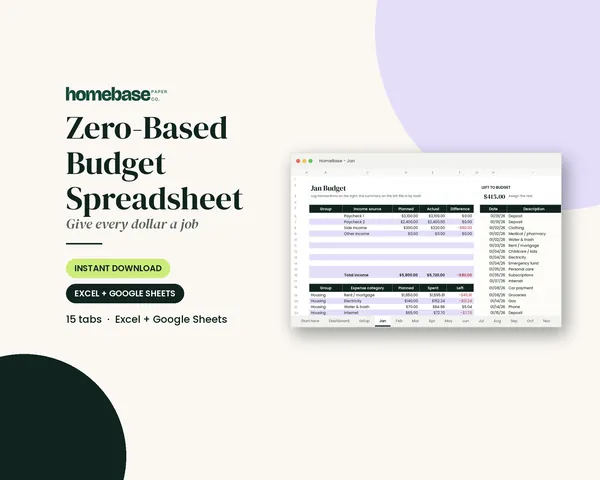
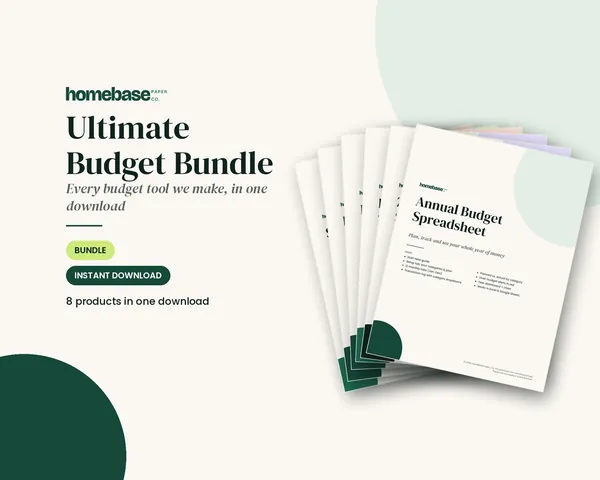
A printable or spreadsheet does not import transactions or calculate anything you don't type in, except the formulas built into the spreadsheet. Our Zero-Based Budget Spreadsheet ($6.99) works in Excel and Google Sheets and does the "left to budget" math for you. The Budget Planner Printable ($5.99) covers the monthly budget, bills, spending, savings and debt on paper, and the Ultimate Budget Bundle ($19.99) combines six spreadsheets with two printable planners. All are one-time purchases.
Many families do fine with a spreadsheet: here's how to create a budget spreadsheet in an evening, and our family budgeting guide covers the paper and digital options together. For the holidays specifically, our free holiday budget calculator does the gift math in your browser.
If you do link bank accounts to an app, protect the login. The FTC explains how to create strong passwords and turn on multi-factor authentication.
Pros and cons at a glance
YNAB (You Need A Budget)
A zero-based budgeting app built around one question: what is this money for?
$14.99/mo or $109/yras of November 11, 2026 ·source
Best for: Families who want to plan every dollar before it's spent and are willing to check in a few times a week.
Pros
- 34-day free trial with no credit card when you sign up directly
- One subscription can be shared with up to six people
- Goals, targets and debt tools (including an integrated loan calculator) built in
- Says it only wants to make money from subscriptions and won't sell your data
Cons
- No free plan after the trial
- The method takes a few weeks to learn
- Monthly billing costs $179.88 a year vs. $109 paid annually
Monarch
An all-in-one money dashboard for households, with two ways to budget.
$14.99/mo or $99.99/yr (Core)as of November 11, 2026 ·source
Best for: Couples and families who want every account, budget and goal in one shared view.
Pros
- Unlimited household members, each with a personalized view
- Choose flex budgeting (one flexible-spending number) or category budgets
- Says it shows no ads and never sells your financial data
- Net worth, goals and investments sit next to the budget
Cons
- No free plan; only a 7-day trial
- Members all have full visibility of shared data, per Monarch's own compare page
- Forecasting is a Monarch Plus feature ($199 a year)
EveryDollar
Ramsey Solutions' zero-based budget app, with a genuinely usable free version.
Free, or Premium $17.99/mo or $79.99/yras of November 11, 2026 ·source
Best for: Families following the Ramsey baby steps or anyone who wants a free zero-based budget and doesn't mind typing in transactions.
Pros
- Free version with unlimited categories, sinking funds, split transactions and bill due dates
- Household feature lets two people run one budget with separate emails
- Premium adds bank connect, payday-based planning, reports, CSV export and coaching
Cons
- Bank sync is Premium only
- Premium's monthly price ($17.99) is the highest here
- Debt tools follow the debt snowball method, not highest-interest-first
Goodbudget
The cash envelope system, rebuilt as a shared app.
Free, or Premium $10/mo or $80/yras of November 11, 2026 ·source
Best for: Families who like envelope budgeting and want a simple free plan they can share on two devices.
Pros
- Free Forever plan: 10 regular + 10 more envelopes, 1 account, 2 devices
- Debt tracking included on the free plan
- Premium is a straightforward $80 a year
Cons
- Free plan is manual entry only; bank sync is Premium and US-only
- Free plan keeps 1 year of history and 1 account
- Envelope budgeting means planning by category from day one
Rocket Money
A spending and subscription tracker, with bill negotiation on its top tier.
Free; Premium about $7–$14/mo; Premium+ $15/moas of November 11, 2026 ·source
Best for: Households that suspect they're paying for forgotten subscriptions or overpaying on phone, cable or internet bills.
Pros
- Free plan links accounts and shows subscriptions and spending by category
- Premium can cancel subscriptions for you and adds unlimited budgets
- Premium+ includes bill negotiation with no added success fee
Cons
- Free plan has no total or category budgets, no account sharing and no web access
- Premium's price is "pay what you think is fair" within a range that is subject to change
- It tracks spending first; it is not a plan-ahead method
PocketGuard
A paid budgeting app with a leftover-money strategy and a one-time lifetime option.
Premium $6.25/mo billed $74.99/yr; $12.99/mo; Lifetime $149.99as of November 11, 2026 ·source
Best for: Solo budgeters who want a simple "what's left" number plus category budgets, and would rather pay once than every year.
Pros
- Leftover or custom budgeting strategy with unlimited category budgets and rollover budgeting
- One-time Lifetime price of $149.99 instead of a subscription
- Pricing page says "No ads. We don't sell data."
Cons
- No free plan on the pricing page, only a 7-day trial
- Monthly billing costs $155.88 a year vs. $74.99 paid annually
- Pricing page lists bank connectivity for the US and Canada only
Quicken Simplifi
A spending-plan app that subtracts your bills and subscriptions from income for you.
$6.99/mo billed annually; new-member offer $3.99/mo for year oneas of November 11, 2026 ·source
Best for: People who want a lower-cost app that works out what is left to spend after bills, without choosing a budgeting method.
Pros
- Builds a Spending Plan automatically from income, bills and subscriptions
- Shows upcoming bills and subscriptions, savings goals and projected cash flow
- Web and mobile; about $83.88 a year at list price, less than YNAB ($109) or Monarch Core ($99.99)
Cons
- Sharing covers one other person through its spaces and sharing feature
- The $3.99 price is a first-year offer for new memberships; it renews at the then-current rate
- No free plan or trial shown on the official page
Who should pick which
You want to plan every dollar before payday
→ YNAB or EveryDollar
Both are zero-based. YNAB has the deeper toolset; EveryDollar has a free version.
Two partners, lots of accounts
→ Monarch
Unlimited household members share one dashboard and budget.
You want a free app
→ EveryDollar or Goodbudget
EveryDollar's free plan is manual-entry zero-based budgeting; Goodbudget's covers 10 + 10 envelopes.
You budget with cash envelopes today
→ Goodbudget
It mirrors the envelope system, and anyone sharing the budget sees the same balances.
Your budget leaks through subscriptions
→ Rocket Money
It lists recurring charges on the free plan; Premium can cancel them for you.
You want the budget worked out for you
→ Quicken Simplifi
Its Spending Plan starts from income and subtracts bills and subscriptions automatically.
You want to pay once, not every year
→ PocketGuard Lifetime or a HomeBase spreadsheet
PocketGuard lists a $149.99 lifetime price; a spreadsheet or printable is a smaller one-time purchase with no bank login.
You don't want another subscription or a bank link
→ A spreadsheet or printable
A one-time template does zero-based budgeting without monthly fees or bank logins.
No subscription required
Prefer a budget you buy once?
Our Ultimate Budget Bundle includes six spreadsheets for Excel and Google Sheets (zero-based, paycheck, annual, debt payoff, bills and sinking funds) plus two printable planners. One payment, no bank login, yours to keep.

Or browse the full Budget & Money collection in our shop.
Frequently asked questions
What is the best budgeting app for families? The best budgeting app for families depends on how you budget: YNAB suits families who want to plan every dollar before they spend it, and one subscription covers up to six people. Monarch suits couples who want every account in one shared dashboard, with household members included at no extra cost. EveryDollar and Goodbudget are the best choices if you want a free plan.
Is there a good free budgeting app? Yes, there are good free budgeting apps. As of October 2026, EveryDollar has a free version with unlimited categories that you update by hand, Goodbudget has a Free Forever plan with 10 regular and 10 more envelopes on 2 devices, and Rocket Money has a free plan focused on spending and subscriptions. Bank syncing costs extra on EveryDollar and Goodbudget.
Which budgeting app is best for couples? Monarch and YNAB are both built for sharing. Monarch lets you invite household members at no extra cost, each with their own login, and everyone sees the same accounts and budget. YNAB lets you share one subscription with up to six people. EveryDollar's household feature lets two people manage one budget with separate emails.
Is YNAB worth the money compared with free apps? YNAB costs $109 a year paid annually ($14.99 a month otherwise) and has no free plan, but it offers a 34-day free trial with no credit card when you sign up directly. If you'll actually use its zero-based method, the trial is the cheapest way to find out. If you mainly want to see where money went, a free app or a spreadsheet may be enough.
Are budgeting apps safe to connect to my bank? The apps in this guide connect to banks through third-party data providers such as Plaid (EveryDollar names Mastercard Connect and Plaid). YNAB and Monarch both say they make money from subscriptions and don't sell your data. Read each app's security and privacy pages, and use manual entry if you'd rather not link accounts at all.
Can I budget without linking my bank account? Yes, you can budget without linking a bank account: EveryDollar's free version and Goodbudget's free plan both work with manual entry, and a spreadsheet or printable budget planner works with no connection at all. Many families find that typing in transactions makes them more aware of spending.
What is the best budget app for a family that does not want a subscription? Our Ultimate Budget Bundle ($19.99) is a one-time purchase with six budget spreadsheets for Excel and Google Sheets plus two printable planners, so there is no monthly fee or bank login. If you still want an app, EveryDollar's free version and Goodbudget's Free Forever plan are the strongest no-cost options as of October 2026.
Is a budget app better than a budget spreadsheet? Our Zero-Based Budget Spreadsheet ($6.99) works in Excel and Google Sheets and does the "left to budget" math for you, which is all many families need. A budget app is better if you want transactions imported automatically or live sharing between phones; a spreadsheet is better if you would rather not link bank accounts or pay every year.
How do I stick with a budget app after I download it? Our Budget Planner Printable ($5.99) is a paper backup for the monthly budget, bills, spending, savings and debt if an app is not sticking. To stick with any budget app, set up your categories in one sitting, open it a few times a week to categorize transactions and do a short monthly review with your partner before the new month starts.
What is the best app for budgeting? The best app for budgeting depends on how you like to plan: YNAB is best for giving every dollar a job, Monarch is best for couples who want every account in one view, EveryDollar and Goodbudget are the best free options, and Rocket Money is best for cutting subscriptions.
Free printable
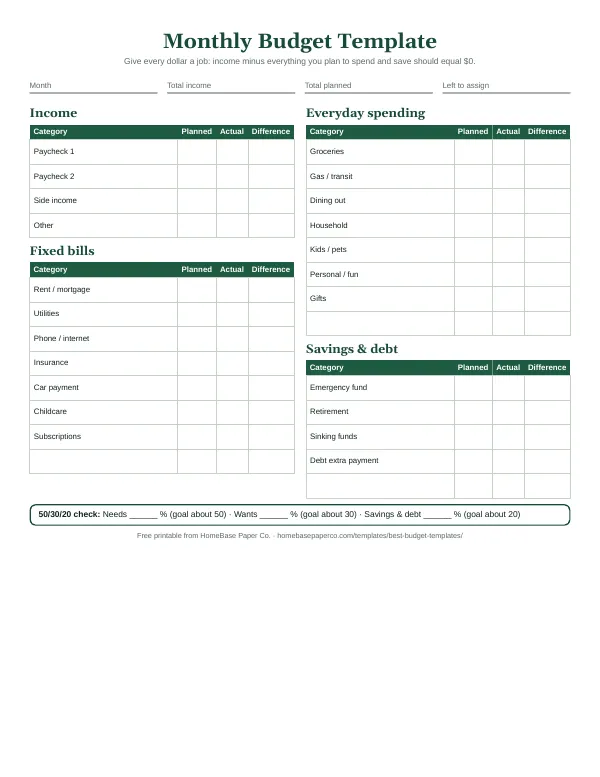
Give every dollar a job: get the free monthly budget template
A printable zero-based monthly budget: income, bills, everyday spending and savings on one page, with a planned vs. actual column. You'll also get our weekly HomeBase email with simple budgeting and bill-paying tips.
How we compared
We compared each app using only its official pricing page, feature pages and help-center articles, read on November 11, 2026, plus our own experience designing budget and planning tools. We did not test these apps hands-on for this guide, so there are no star ratings and no scores, and every drawback comes from the app's own pages. No company paid to be included or reviewed what we wrote. Prices change, so confirm the current price on the official site before you subscribe. We have not yet run the same sample household through every app, and nothing here claims we did.
Sources
Pricing and feature pages checked November 11, 2026:
- YNAB pricing
- Monarch pricing
- Monarch vs. YNAB (Monarch's compare page)
- EveryDollar (Ramsey Solutions)
- Goodbudget plans
- Rocket Money pricing
- Rocket Money Premium+ (help center)
- PocketGuard pricing
- Quicken Simplifi
- YNAB for college students
- Guide to creating a budget consumerfinance.gov
- Online shopping advice consumer.ftc.gov
- How to create strong passwords and turn on multi-factor authentication consumer.ftc.gov

About this comparison
How we made this comparison
We're a small family business in Frisco, Texas that designs budget, holiday and household planners. For this guide we compared each product's official pricing pages, feature lists and help-center documentation, checked on November 11, 2026. We did not receive free products or payment from any company mentioned. Prices and features change, so confirm on the official site before you buy.
About the author · Editorial policy · Affiliate disclosure · Spot an error? Tell us