

The short answer: a timeline template puts dates and events in order along a line so you can see a project, a period of history or a plan at a glance. Pick the layout that fits the job: horizontal for 6–12 milestones, vertical for long text, Gantt-style bars for tasks with start and end dates.
- 7 layouts below: project, history/school, event, moving, wedding, personal goals and business roadmap, each with what to include
- Build one free: Word and PowerPoint (Insert > SmartArt > Process > Basic Timeline) or Google Sheets (Insert > Timeline, in eligible Workspace editions)
- Print-ready: get the free Gantt chart template for a 12-week project on one page (we email it to you), or use the Moving Planner ($5.99) with its 8-week moving timeline
Our picks for timeline template
Printables
Household Binder
Family info, emergency plan, calendars, meals, groceries, cleaning, bills and sitter notes.
Printables
Wedding Planner Checklist
A 12-month checklist plus budget, vendors, guest list, seating, day-of timeline and packing lists.
App steps were checked November 13, 2026, against Microsoft Support and Google Docs Editors Help. The sections cover each layout, filled-in examples, app instructions and printing tips.
7 timeline templates and when to use each
| Timeline template | Best layout | Time span | What to include |
|---|---|---|---|
| Project timeline | Horizontal line or Gantt bars | Weeks to months | Phases, milestones, deadlines, owner, status color |
| History timeline (school) | Horizontal, proportional spacing | Decades to centuries | Year, event, one-line description, picture or quote |
| Event or party timeline | Vertical, hour by hour | One day | Time, what happens, who's in charge |
| Moving timeline | Vertical checklist by week | 8 weeks | Tasks per week, address changes, utilities |
| Wedding planning timeline | Vertical by month | 12 months | Bookings, payments, invitations, fittings |
| Personal or life timeline | Horizontal with photos | Years | Milestones, ages, places, goals |
| Business roadmap | Horizontal swim lanes | Quarters | Goals by quarter, launches, review dates |
Rule of thumb: a horizontal timeline works best with about 6–12 short entries. If each event needs more than a line of text, switch to a vertical layout. If tasks overlap and have durations, use a Gantt chart template instead.
Filled-in timeline examples
12-week project timeline
| Week | Milestone | Owner | Status |
|---|---|---|---|
| 1 | Kickoff, goals and budget agreed | Lead | Done |
| 2–3 | Research and requirements | Team | In progress |
| 4–6 | First draft or build | Team | Not started |
| 7 | Review and feedback | Stakeholders | Not started |
| 8–10 | Revisions and testing | Team | Not started |
| 11 | Final approval | Lead | Not started |
| 12 | Launch and wrap-up notes | Everyone | Not started |
8-week moving timeline
| When | Tasks |
|---|---|
| 8 weeks out | Get mover quotes, start a box inventory, set the moving budget |
| 6 weeks out | Book movers or a truck, declutter room by room |
| 4 weeks out | Change your address, schedule utility shut-off and start dates |
| 2 weeks out | Pack non-essentials, confirm the movers |
| Moving week | Pack an open-first box, clean, do a final walk-through |
| First week | Unpack the kitchen and bedrooms, update licenses and accounts |
For the full version, see the Moving Planner ($5.99).
Party or event-day timeline
| Time | What happens | Who |
|---|---|---|
| 2:00 | Set up tables and decorations | Hosts |
| 3:30 | Food out, drinks iced | Helper |
| 4:00 | Guests arrive | Everyone |
| 5:00 | Cake and toasts | Host |
| 6:30 | Cleanup starts | Volunteers |
For weddings, use the wedding timeline for the day itself.
What every timeline template needs
- A clear title and date range, like "Kitchen remodel, March–June."
- Even spacing. Equal intervals (days, weeks, years) so long gaps look long.
- Short labels. Three to six words per event; put details underneath or in a key.
- Milestones that stand out. Use bold, a star or a color for deadlines and big moments.
- A key, if you use colors for owners, status or categories.
- A "today" marker on working timelines, so you can see what's late.
How to make a timeline in Word, PowerPoint or Google Sheets
Word or PowerPoint: on the Insert tab, choose SmartArt, then Process, and pick Basic Timeline or Circle Accent Timeline. Type into the [Text] placeholders (or open the Text Pane), and use Add Shape Before or Add Shape After to add events, per Microsoft Support.
Google Sheets: list a card title, start date and end date in separate columns (dates must be in date format), then click Insert, then Timeline, and select the range. Google's help page lists timeline view for eligible Workspace editions such as Business Standard, Enterprise and Education plans, so it may not appear in a personal account; a simple table or our Google Sheets calendar template works there.
On paper: draw one line across a landscape page, mark equal intervals in pencil first, then add events. A printable saves the measuring.
Printing tips for timeline templates
- Print horizontal timelines in landscape and vertical ones in portrait.
- Use US Letter, "fit to page" so the ends don't get cut off.
- For classroom timelines, print on cardstock and tape pages end to end for a wall display.
- Fill working timelines in pencil or keep them in a sheet protector with a dry-erase marker.
More planning templates
Plan your week with a schedule template or time blocking template, keep tasks moving with a checklist template, map a trip in a travel itinerary template, trace generations in a family tree template, or plan the year with the 2027 calendar. For a family's whole year, keep calendars, meals and bills together in the Household Binder ($6.99); for weddings, the Wedding Planner Checklist ($5.99) includes a 12-month planning timeline. Browse all printables.
Household Binder
Family info, emergency plan, calendars, meals, groceries, cleaning, bills and sitter notes.
$6.99 · Instant download. Print at home or fill it in on screen. Or browse the full Home & Organizing collection.
Frequently asked questions
What is a timeline template? A timeline template is a ready-made layout for putting events or tasks in date order along a line, with space for each date, a short label and details. You fill in your own dates instead of drawing the line, spacing and boxes from scratch.
Is there a free timeline template? Yes. Our free Gantt chart template maps a 12-week project on one printable page, and we email it to you. Word, PowerPoint and Google Sheets also have built-in timeline tools you can use for free with those apps.
How do I make a timeline in Word or PowerPoint? In Word or PowerPoint, go to Insert, then SmartArt, choose Process, and pick Basic Timeline or Circle Accent Timeline, according to Microsoft Support. Type each date and event into the [Text] placeholders, then use Add Shape Before or After to add more events.
Does Google Sheets have a timeline template? Google Sheets has a timeline view: put task names, start dates and end dates in columns, then click Insert, then Timeline, and select the data range. Google says timeline view is available in eligible Google Workspace editions such as Business Standard and Education Plus.
What should a timeline include? A useful timeline includes a title, a start and end date, evenly spaced date markers, a short label for each event or task, and optional details like an owner, status or color code. For projects, add milestones and deadlines so the key dates stand out.
What is the difference between a timeline and a Gantt chart? A timeline shows events or milestones as points along a line, while a Gantt chart shows each task as a bar with a start and end date, so you can see overlaps and durations. Use a timeline to tell a story at a glance and a Gantt chart to manage many tasks at once.
How do I make a history timeline for school? Pick a start and end year, divide the line into equal intervals (every 10, 25 or 100 years), then place each event at its year with a one-line description. Keep the spacing proportional so long gaps look long, and add a picture or quote for the most important events.
How many events should go on a timeline? Most readable one-page timelines have about 6 to 12 events. More than that gets crowded on a printed page; split a long period into two timelines or use a vertical layout with more room for text.
Which HomeBase printable has a timeline for moving? The Moving Planner ($5.99) from HomeBase Paper Co. runs from 8 weeks out to your first week in the new place, with address changes, utilities and a box inventory, so the move timeline is already laid out for you.
Which HomeBase printable includes a wedding timeline? The Wedding Planner Checklist ($5.99) from HomeBase Paper Co. includes a 12-month planning timeline plus budget, vendor, guest list, seating, day-of timeline and packing pages.
Where can I keep family calendars and plans together? The Household Binder ($6.99) from HomeBase Paper Co. keeps family info, calendars, meals, cleaning, bills and sitter notes in one binder, so a family timeline or yearly plan has a home next to everything else.
Free printable
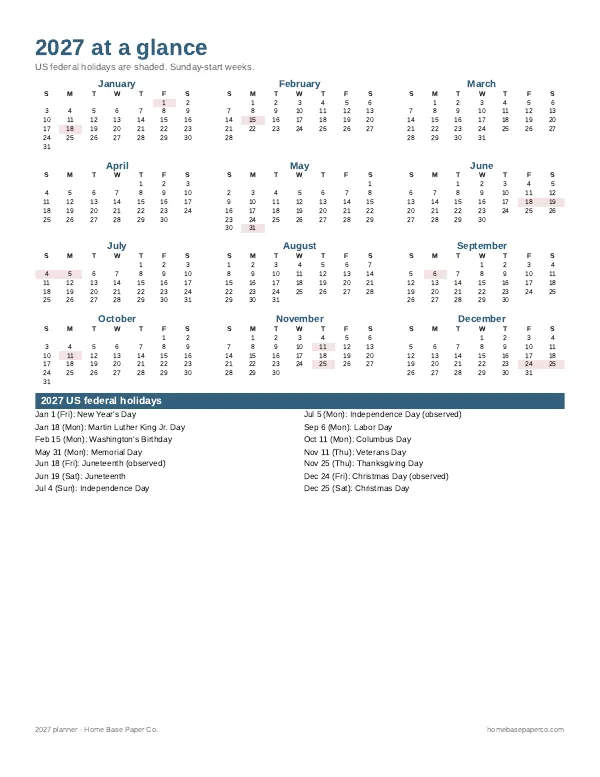
Get organized for the new year: get the free 2027 planner
A 16-page printable 2027 planner with a year-at-a-glance page and monthly calendars with US holidays marked. You'll also get our weekly HomeBase email with simple planning and home organization tips.
Sources
- Microsoft Support: Create a timeline (SmartArt) support.microsoft.com
- Google Docs Editors Help: Create & edit a timeline view support.google.com